Dice
The dice system is a convenient way to roll and manage dice for yourself in your roleplay server.
Note
All user/player-facing dice commands are stored in /dice.
Where Can The Dice System Be Used?
The dice system can be used in any server where PYTHIA is in. However, PYTHIA can also be installed onto yourself, allowing you to use the dice system in servers where PYTHIA is not in or even in your DMs with the bot!
Simply use this link (or /invite, or the "Add Bot" option) to add the bot to yourself. Afterwards, you should be able to see the /dice commands anywhere.
Rolling Dice
To roll dice, you can use /dice roll followed by the dice notation you want to roll:
Dice Notation
The die/dice notation supported by this bot is based on Avrae's notation, so most notation for that bot should work here. That being, said modifications have been made to the system to support a few more common dice notations (such as using ! without a number for explosions).
For a detailed list of the syntax supported by this bot, you can check the notation parser's page.
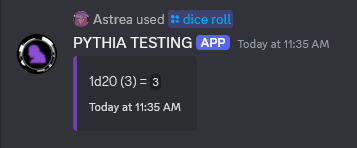
Visibility
For some servers, the results of dice rolls are only visible to you. You can ask the staff to change this setting if you want the results to be visible to everyone.
Adding/Registering Dice
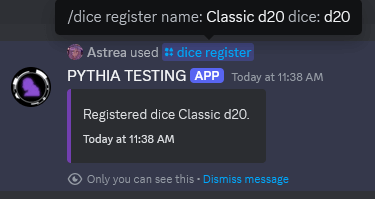
To register a die for yourself, you can use the /dice register:
Note
Dice are registered per-server, or if used in servers where PYTHIA is not in or in DMs, they are registered globally for you.
Listing/Removing Dice
To see what die are currently registered, you can use /dice list:
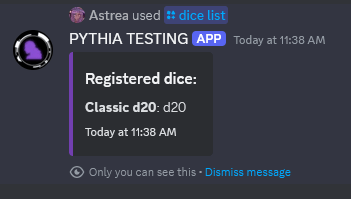
To remove a registered die, you can use /dice remove.
To remove all registered dice, you can use /dice clear.
Rolling Registered Die
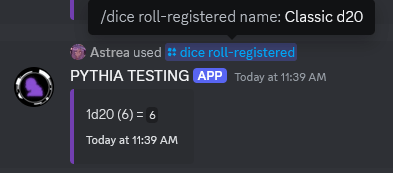
To roll a registered dice, you can use /dice roll-registered:
Exporting/Importing Registered Die
If you wish to transfer your die to another server, or just wish to create a shareable list of die in general, the process is simple.
To export your die for a particular server, you can use /dice export in the server you wish to export your die from (if ran outside of a server PYTHIA is in, it will export your global list of die). This should give you a file ending in .json; this is a JSON file, and it can be shared around freely. No private information is stored on these other than basic information about the die themselves.
You can also edit it directly if you wish; this should not be necessary, but can be done for advanced usecases. If you choose to do so, please expand the below note.
Notes for Editing JSON
While editing the JSON file, please keep in mind some limitations:
- You are generally expected to know how JSON files work. There will be no support given for editing JSON files.
- Keep the version number the same! The version number is used to indicate the format of the die, which makes sure JSON files work even in the future. Changing it can lead to unexpected side effects.
- Stay to the format that your JSON file has. Any deviations will likely not be tolerated.
- The bot enforces the same limitations as making die through the bot itself.
Regardless, you may import exported die for a server (or globally, if ran outside of a server PYTHIA is in) through /dice import and giving your JSON file. This may be done from other servers other than the server where the file was exported from.
The bot, by default, will error out if there are any die in the export that overlap with die already in the server. To get around this, you can use the override option in /dice import to replace those die.